
From "the faucet is dripping" to "fixed" — with everyone in the loop
One app connecting tenants, property managers, and maintenance teams — so every issue is reported once, assigned clearly, and tracked by all three sides until it's done.
From "the faucet is dripping" to "fixed" — with everyone in the loop
One app connecting tenants, property managers, and maintenance teams — so every issue is reported once, assigned clearly, and tracked by all three sides until it's done.
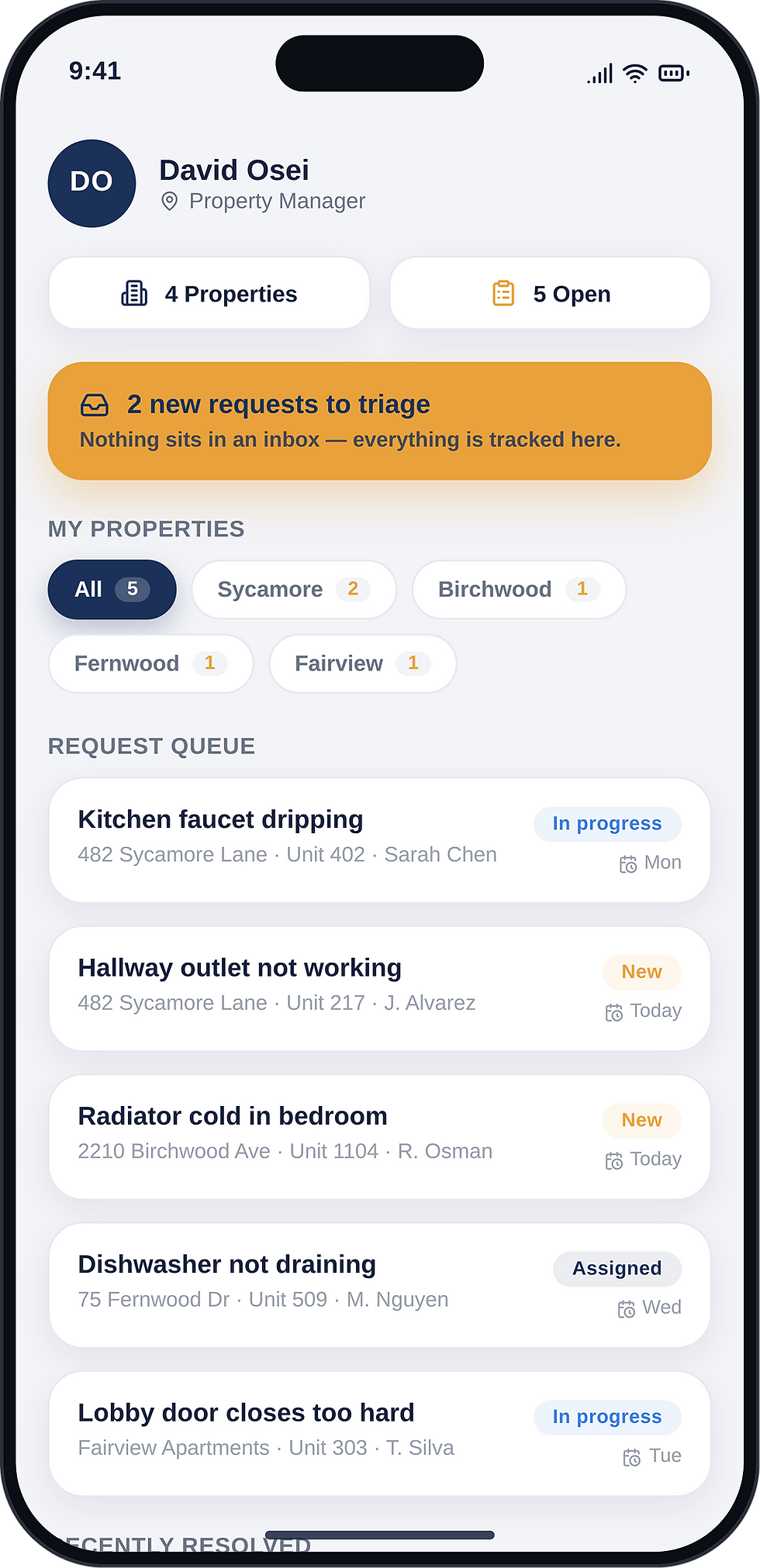
Manager's view
This is a space to welcome visitors to the site. Grab their attention with copy that clearly states what the site is about, and add an engaging image or video.

Product Name
This is the space to introduce the Product section and showcase the types of products available.
Product Name
This is the space to introduce the Product section and showcase the types of products available.


Product Name
This is the space to introduce the Product section and showcase the types of products available.
Product Name
This is the space to introduce the Product section and showcase the types of products available.
The situation
When something breaks in a rental property — a dripping faucet, AC or heating acting up, dumpsters overflowing, snow left uncleared — the report can arrive anywhere: an email, a phone call, a text, a hallway conversation. Property managers were reassembling each issue from fragments: which tenant, which unit, which property, how urgent, who already knows about it?
Then came the second half of the problem: getting it fixed. Maintenance staff arrived at units knowing little beyond "something's wrong with the sink." Tenants, hearing nothing back, reported the same issue again through another channel — creating duplicates that made the picture even murkier. Nobody could say with confidence which issues were open, which were overdue, or who was responsible for what. And across a whole portfolio, there was no way to see which properties generated the most problems or how long fixes really took.

Understanding it together
We followed a single repair through its real-life path — from the tenant's first message to the closed job — and marked every hand-off where information was lost, retyped, or repeated. We talked to all three sides: tenants who felt they were reporting into a void, managers buried in scattered channels, and maintenance crews tired of arriving blind.
The insight that shaped the design: this wasn't three tools for three roles. It was one chain of custody for an issue, where each side needs to see different details of the same shared truth — and where silence, not slowness, was what frustrated people most. People can accept "it'll be fixed Thursday." What they can't accept is not knowing.
From prototype to delivery
We prototyped the full chain as one flow: a tenant submits an issue with photos, the manager sees it land with unit and property attached, assigns a maintenance member, and everyone watches the status move. Tenants tested the submission flow (it had to take under two minutes, phone in hand, standing next to the leak). Managers tested triage and assignment. Maintenance tested the mobile view they'd use on-site — offline notes included, because basements have terrible signal.
After design and build, we rolled out property by property: one building first, feedback folded in, then the rest of the portfolio. Old channels weren't banned overnight — but as tenants saw issues actually move, the app became the obvious front door on its own.

Maintenance feed

Administrator overview

Maintenance job board
What we built
Organizers vs Volunteers
4/ What
Beginner
Intermediate
Advanced
01
Describe the service and how customers or clients can benefit from enrolling to the course.
Submit an issue in a couple of minutes: describe the problem, attach photos or videos, pick the category — unit issue or common area (garbage, snow, lighting, anything)
Beginner
02
Describe the service and how customers or clients can benefit from enrolling to the course.
Live status: see when the manager reviewed the claim, who's assigned, and when the fix is scheduled
Intermediate
03
Describe the service and how customers or clients can benefit from enrolling to the course.
Notifications at every stage — no need to call and ask "did anyone see this?"
Beginner
1/ For tenants
01
Describe the service and how customers or clients can benefit from enrolling to the course.
Every request lands in one queue — never in email, texts, and voicemail simultaneously
Beginner
02
Describe the service and how customers or clients can benefit from enrolling to the course.
Each issue arrives complete: tenant name, unit, property, description, media, history
Intermediate
03
Describe the service and how customers or clients can benefit from enrolling to the course.
Availability view of the maintenance team; assign an issue in two clicks
Beginner
04
Describe the service and how customers or clients can benefit from enrolling to the course.
Live board of everything open, in progress, overdue — across all properties
Beginner
2/ For property managers
Beginner
Intermediate
Advanced
01
Describe the service and how customers or clients can benefit from enrolling to the course.
Full context before arriving: tenant's notes, photos, videos, unit access details
Beginner
02
Describe the service and how customers or clients can benefit from enrolling to the course.
Status updates from the field: on my way, in progress, done, needs a part
Intermediate
03
Describe the service and how customers or clients can benefit from enrolling to the course.
Job history per unit — see what was fixed there before
Beginner
3/ For maintenance teams
01
Describe the service and how customers or clients can benefit from enrolling to the course.
Per-property reports: which properties generate the most issues, and of what kind
Beginner
02
Describe the service and how customers or clients can benefit from enrolling to the course.
Time-to-fix tracking, overdue claims with reasons, workload per maintenance member
Intermediate
03
Describe the service and how customers or clients can benefit from enrolling to the course.
A clear accountability trail: who was responsible for what, when, and where
Beginner
4/ For the business

Tenant's home

Create a request

See completed task
4/ Ready for a Full Course?
10 Meetings
Marathon
Empower Your Learning: Master AI in 10 Expert-led Sessions
Beginner
Intermediate
Advanced
01
Data Science Meets AI
Describe the service and how customers or clients can benefit from enrolling to the course.
Beginner
02
AI Business Program
Describe the service and how customers or clients can benefit from enrolling to the course.
Intermediate
03
AI Music Production
Describe the service and how customers or clients can benefit from enrolling to the course.
Beginner
04
AI Camp for Kids
Describe the service and how customers or clients can benefit from enrolling to the course.
Beginner
05
AI Camp for Teenagers
Describe the service and how customers or clients can benefit from enrolling to the course.
Beginner
The situation
Our client -
a busy moving company — wasn't short on software. They already had a well-known CRM. On paper, it did everything. In practice, that was the problem: it did everything *except* fit them.
Terms & Conditions - the basics
Having said that, Terms and Conditions (“T&C”) are a set of legally binding terms defined by you, as the owner of this website. The T&C set forth the legal boundaries governing the activities of the website visitors, or your customers, while they visit or engage with this website. The T&C are meant to establish the legal relationship between the site visitors and you as the website owner.
T&C should be defined according to the specific needs and nature of each website. For example, a website offering products to customers in e-commerce transactions requires T&C that are different from the T&C of a website only providing information (like a blog, a landing page, and so on).
T&C provide you as the website owner the ability to protect yourself from potential legal exposure, but this may differ from jurisdiction to jurisdiction, so make sure to receive local legal advice if you are trying to protect yourself from legal exposure.
What to include in the T&C document
Generally speaking, T&C often address these types of issues: Who is allowed to use the website; the possible payment methods; a declaration that the website owner may change his or her offering in the future; the types of warranties the website owner gives his or her customers; a reference to issues of intellectual property or copyrights, where relevant; the website owner’s right to suspend or cancel a member’s account; and much, much more.
To learn more about this, check out our article “Creating a Terms and Conditions Policy”.
What we achieved
Facts
3/ What
“ This is the space to share a review from one of the business's clients or customers”
75% of issues resolved without a single follow-up call from the tenant
“ This is the space to share a review from one of the business's clients or customers”
Overdue claims visible instantly — with reasons
“ This is the space to share a review from one of the business's clients or customers”
Managing 15 properties
and 480 units on the platform
“ This is the space to share a review from one of the business's clients or customers”
Average time-to-fix: from 9 days to 2 days
Designed with You in Mind
This is the space to introduce the Product section. Showcase the types of products available and underline any important or unique features.

Manager detail
Administrator overview
Maintenance job
05/ What will
You Achieve
Essential AI Knowledge Base
ֿDescribe the service and how customers or clients can benefit.
Hands-on Workshops on All Leading Platforms
Describe the service and how customers or clients can benefit.
Accredited Diploma for Future Jobs
ֿDescribe the service and how customers or clients can benefit.
Networking with AI Visionaries
ֿDescribe the service and how customers or clients can benefit.
Start Your AI Journey with Us!
Embark on the AI Adventure. Let's Get Started